
M
Magic Hour AI
Magic Hour
Magic Hour AI is a browser-based artificial intelligence platform for creating, editing, and transforming videos, images, and audio. It is designed for…
Free plan Freemium
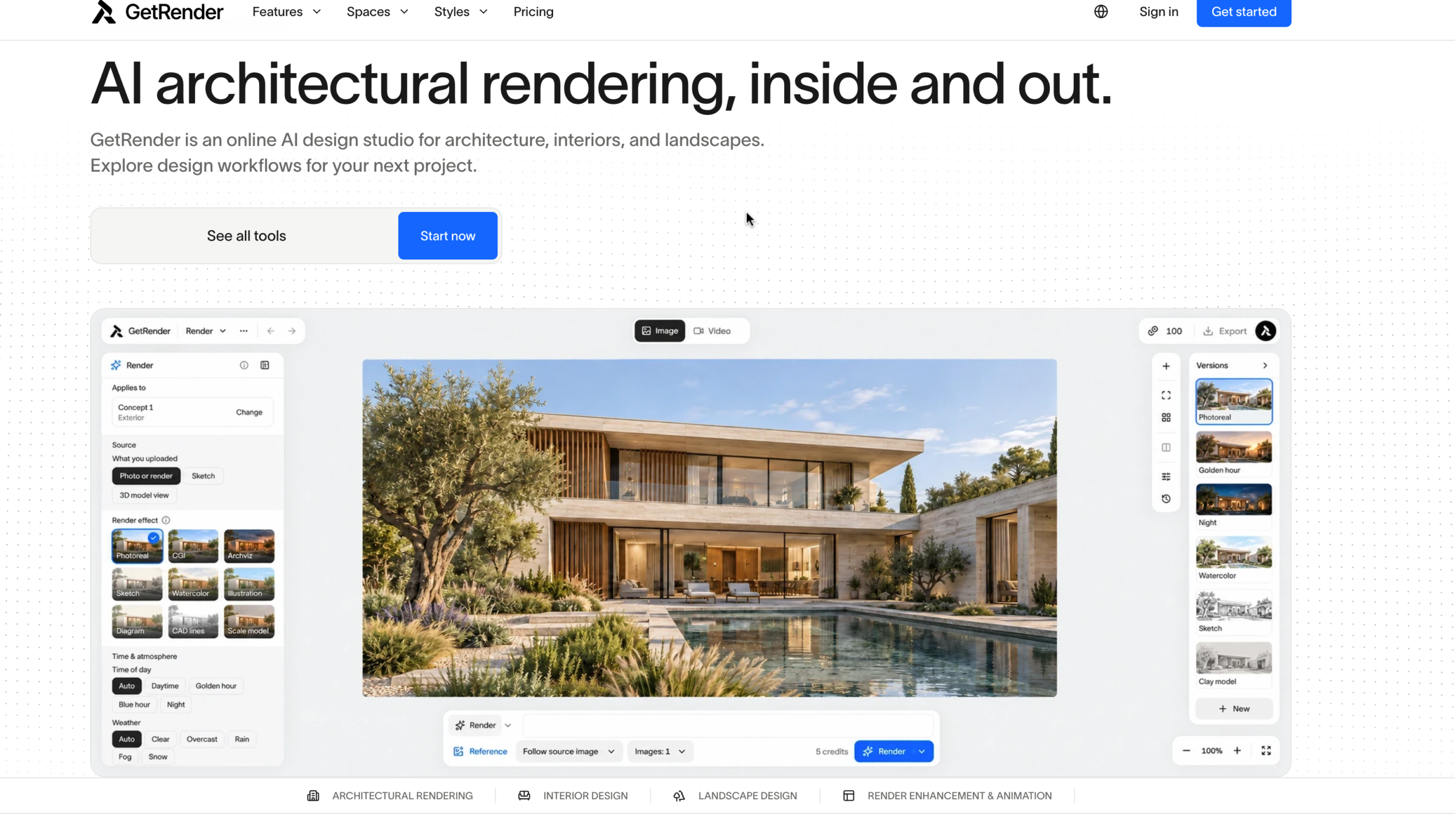
GetRender is an AI-powered architectural design and visualization platform that helps architects, interior designers, construction professionals, and real estate agents turn ideas into visual concepts. Instead of spending hours creating initial designs manually, users can explore different building styles, room layouts, exterior finishes, and landscape ideas using AI.
Available through its website, GetRender.ai, the platform focuses on architecture, interior design, landscaping, and architectural image enhancement. It can help users visualize how a building, room, or outdoor space might look before committing to a final design.
For example, you can use an architectural sketch to explore a modern building exterior, transform an empty room into a furnished living space, or experiment with different materials and lighting.
GetRender follows a simple design workflow that allows users to explore and compare different visual concepts.
The platform is particularly useful during the early stages of design, when you want to compare several ideas before investing time in detailed architectural work. However, AI-generated images can change building geometry and proportions, so they should not replace professional drawings or construction checks.
GetRender allows users to explore building exteriors, facade materials, lighting conditions, and architectural styles. This can help architects and designers present different design directions to clients without producing every concept from scratch.
The interior design workflows focus on room redesign, virtual staging, and experimenting with furniture, finishes, and lighting.
For example, a real estate agent could visualize an empty living room with furniture, while a homeowner could explore different styles before renovating a property.
GetRender also supports landscape concepts involving gardens, courtyards, outdoor living areas, pathways, and planting arrangements.
These visualizations can help clients understand the intended appearance of an outdoor space. They do not, however, verify drainage, site levels, plant suitability, or other technical requirements.
If you already have an architectural rendering, GetRender can help explore improvements to material details, lighting, and visual clarity.
This is useful for designers who want to refine the presentation of an existing concept rather than start over.
GetRender includes an architectural image-to-video workflow for exploring short motion studies from architectural renderings. For example, a designer may want to demonstrate a proposed camera movement around a building.
This can add movement to a design presentation, although the resulting video should be reviewed for visual inaccuracies. <Cite refs={[“turn583445search1”]}/>
The platform presents a variety of architectural and interior styles, allowing users to explore different aesthetics and material combinations.
This is helpful when clients are uncertain about the final look they want. Rather than discussing ideas using words alone, a designer can use AI-generated concepts to make the options easier to compare.
GetRender is available online, so users can access its design workflows through a web browser. Its tools are organized around the type of space or design task being developed.
You should check the individual tool’s supported inputs and controls before uploading a file, because available actions can differ between workflows.
GetRender offers a free plan and three paid plans: Starter, Pro, and Studio. The official pricing page displays the following monthly rates.
| Plan | Price per month | Monthly credits |
|---|---|---|
| Free | $0 | Starter credits, subject to eligibility |
| Starter | $19 | 300 |
| Pro | $49 | 1,000 |
| Studio | $129 | 3,000 |
These prices are in US dollars. Annual billing is also available, with credits issued monthly. Check the official pricing page for the current annual rates and billing terms before purchasing.
Free — $0
The free plan is intended to help users explore the studio before choosing a paid subscription.
Starter — $19/month
Starter is suitable for occasional design exploration and smaller projects.
Pro — $49/month
Pro is a more suitable option for designers who regularly develop concepts and need to compare multiple variations.
Studio — $129/month
Studio is designed for active design studios and users who generate visual concepts at higher volumes. <Cite refs={[“turn583445search0”]}/>
GetRender uses credits across its design tools. According to the official pricing page, each generated result costs five credits, while batch generation consumes credits for each result.
Using that rate as a guide, the monthly allowances could cover approximately the following number of individual results:
| Plan | Credits | Approximate results |
|---|---|---|
| Starter | 300 | 60 |
| Pro | 1,000 | 200 |
| Studio | 3,000 | 600 |
These figures are estimates based on five credits per result. Actual usage can vary depending on the selected tool and generation settings, so check the credit cost before starting a task.
GetRender offers a free plan, but free starter credits are subject to eligibility. The official pricing page does not guarantee a fixed number of free credits for every user.
The free plan allows you to explore the studio, but it has some limitations:
The official refund and cancellation policy also states that a free trial or specific free allowance is not guaranteed unless the relevant offer explicitly provides it. Therefore, check the credits available in your account before starting a project or purchasing a subscription.
These points are based on GetRender’s published pricing and feature information. <Cite refs={[“turn583445search0″,”turn583445search1”]}/>
GetRender is worth considering if you need a faster way to explore architectural concepts, redesign rooms, visualize outdoor spaces, or prepare design presentations.
For beginners and occasional users, the free plan provides an opportunity to explore the available tools if starter credits are offered to their account. The Starter plan at $19 per month may suit users who need regular access without a large monthly credit allowance.
The Pro plan at $49 per month is worth considering for designers who need multiple design variations, while the Studio plan at $129 per month is intended for heavier usage.
However, GetRender should be treated as a visualization tool rather than a replacement for professional design software, engineering calculations, building regulations, or construction documentation. Always check the generated result against the original plans before using it for a real project.
GetRender is a useful AI design platform for architects, interior designers, real estate agents, construction professionals, and homeowners who want to visualize ideas more quickly. Its combination of architectural rendering, room redesign, landscape concepts, and render enhancement makes it versatile for early-stage design work.
Its biggest advantage is the ability to explore different visual directions without manually producing every concept. Its main limitation is that AI-generated imagery may contain inaccuracies, and free access is not guaranteed for every user.
Overall, GetRender is worth exploring if you want to speed up architectural visualization and design presentations. Start with the free plan if credits are available, evaluate the quality of the results, and upgrade when you need watermark-free images, more credits, or multiple design variations.
Magic Hour AI is a browser-based artificial intelligence platform for creating, editing, and transforming videos, images, and audio. It is designed for…
Create gender-swapped portraits, fan art and original characters
AI image-to-image editor for photo restyling and restoration